
Updated 25 November 2026. Plenty of people need two WhatsApp, two Instagram or two Telegram accounts on a single iPhone: one for work, one personal. Logging out and back in every time is tiring and makes you miss messages. Tikmio is a free iPhone app that solves this: it keeps a second (or third) session of the same service open inside a hidden space with its own password. And from the outside it looks like nothing more than a countdown timer. This guide explains what the app does, how to open a second WhatsApp and Instagram session, and how to use the hidden gallery, folder and notes.
Download Tikmio free on the App Store (iOS 17 or later, English and Turkish).
Tikmio at a glance
- Second session: add separate profiles for the official pages of WhatsApp Web, Instagram, Telegram, Facebook, X, LinkedIn, Threads, Outlook or any secure (https) website. Each profile has its own separate, persistent session.
- Hidden space: photos and videos, files, notes and voice recordings are stored encrypted behind the space's own password, with optional Face ID.
- Looks like a countdown timer: the app opens as a simple hourglass counting down; nothing on screen suggests there is a hidden space inside.
- Hidden camera and gallery: photos taken with the in-app camera go straight into the hidden gallery, not into the iPhone Photos app.
- No ads, sign-up, subscription or server: everything stays on your iPhone.
What is Tikmio?
When you open Tikmio you see an hourglass: a calm timer for 3, 5 or 10 minutes or your own duration, which keeps accurate time in the background. The app is perfectly usable as just that.
If you want, you add a private space. It opens with its own password and does two jobs: it opens the websites of social and messaging services in profiles that are independent of each other, and it stores your photos, files and notes encrypted.
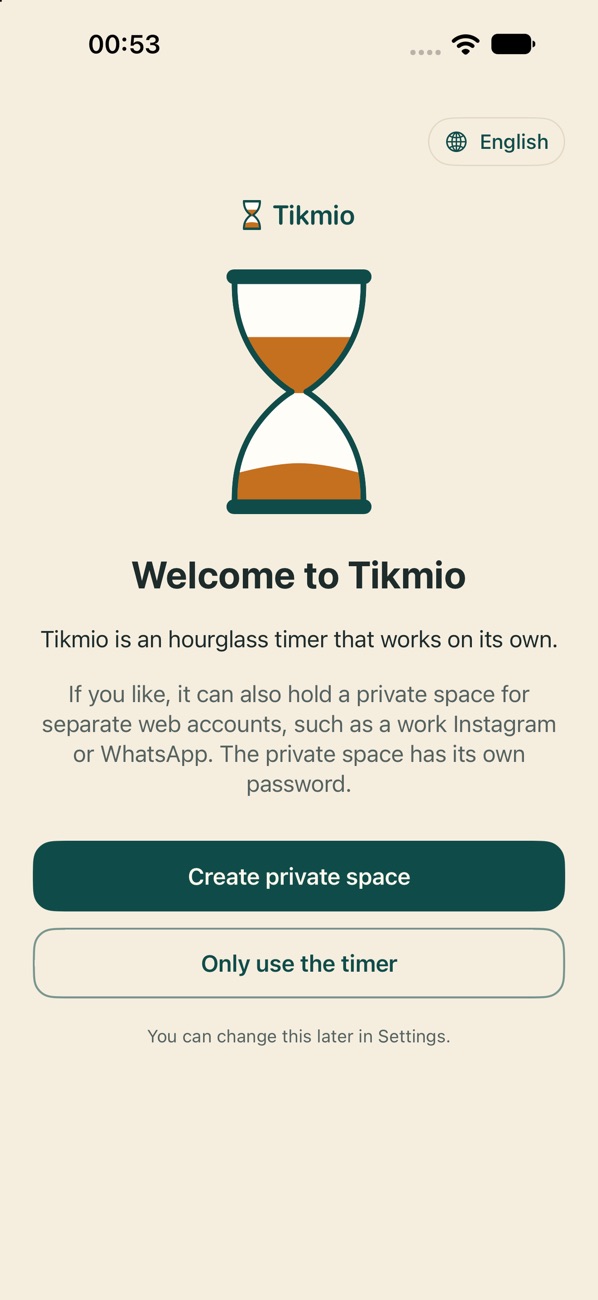
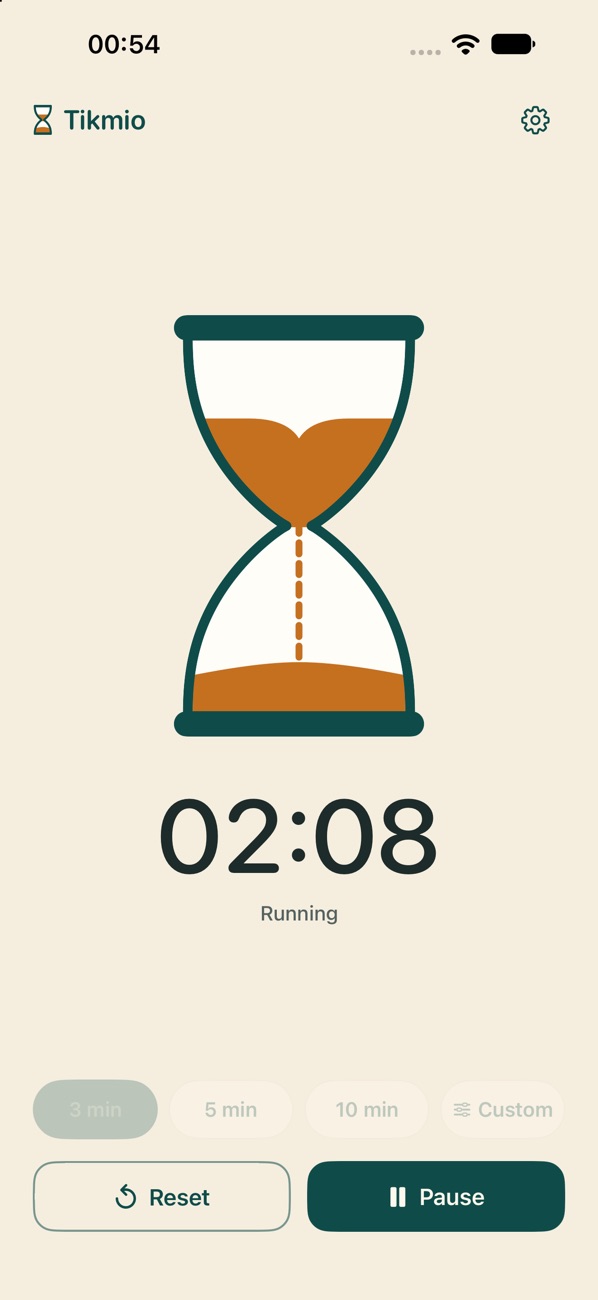
From the outside, just a countdown timer
What sets Tikmio apart from other hidden-folder apps is how it looks. Whoever opens it sees an hourglass counting down: pick a duration, start, pause, reset. It is a real, working timer you can use while brewing tea, in a meeting or while studying.
- The opening screen has no label or button that says "gallery", "vault" or "hidden".
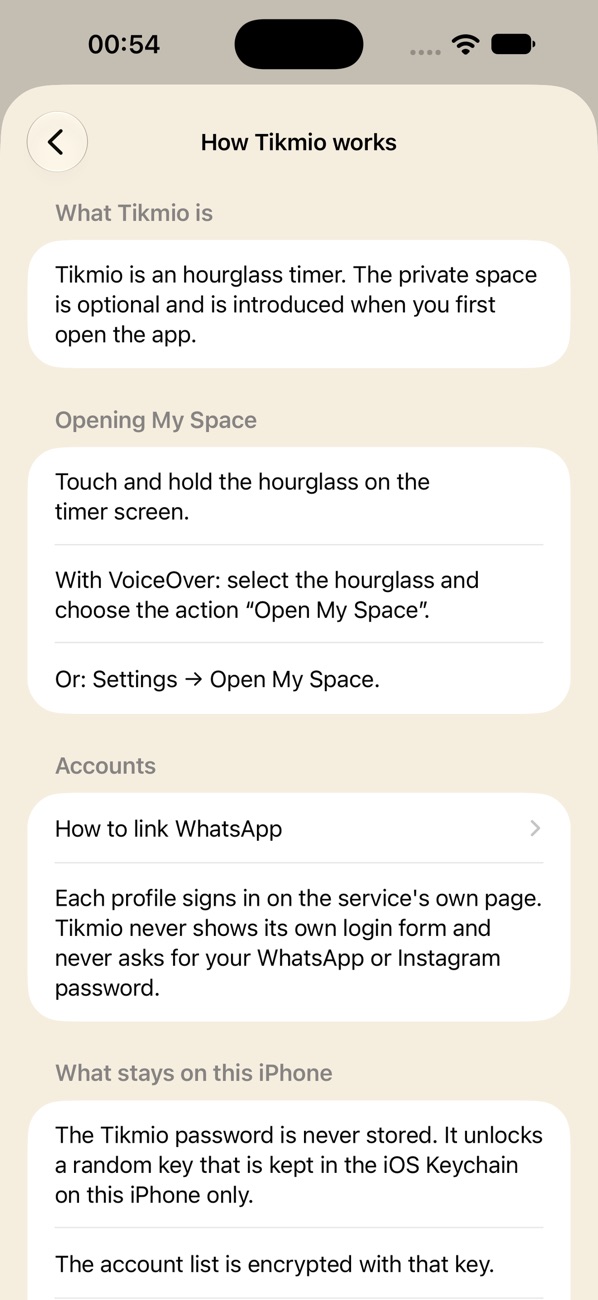
- You enter the private space by touching and holding the hourglass, then entering the password or using Face ID. Someone who does not know the gesture only sees the timer.
- While the private space is open, the app switcher shows a neutral cover instead of your content.
- The private space locks as soon as you leave the app; when it is opened again, the timer is back.
In short, when you hand your phone to someone for a moment, there is an ordinary timer app on the home screen.
Hidden folders and second sessions on iPhone
iPhone has no built-in way to open a second copy of an app and use two accounts side by side. The Hidden album in Photos covers only photos and videos, and it lives inside Photos. Tikmio brings both needs together: a hidden folder, hidden gallery, hidden camera and hidden notes, alongside hidden WhatsApp, hidden Instagram and hidden Telegram sessions, all behind one password.
How a second session works
A browser cannot be signed in to the same site with two accounts at once, because the session is kept in one place. Tikmio keeps a separate session and separate site data for every profile. So "WhatsApp · Work" and "WhatsApp · Personal", or "Instagram · Shop" and "Instagram · Personal", stay open side by side without logging out of either.
One important detail: Tikmio opens these services' own official websites. You sign in on the service's page; Tikmio never shows its own login form and never asks for or sees your WhatsApp or Instagram password.
Setup: creating the private space
- Download Tikmio from the App Store and open it.
- On the welcome screen tap Create private space. If you choose "Only use the timer", you can turn the private space on later in Settings.
- Set a password for the private space. It is separate from your iPhone passcode. Turn on Face ID if you like.
- To enter the private space later, touch and hold the hourglass on the timer screen, or use Settings > Open My Space.
Do not forget the password. The app never stores it and has no server, so nobody can reset it for you.
How to open a second WhatsApp session
The second WhatsApp runs through WhatsApp Web, using WhatsApp's linked-devices feature. The WhatsApp account for your second number has to be set up and active on a phone (for example your other phone, or the WhatsApp Business app on the same iPhone).
- In My Space tap Add account and choose WhatsApp.
- Give the profile a distinguishing name and colour, such as "Work", "Personal" or "Shop".
- The profile opens WhatsApp Web's linking page. If the account is on another phone, scan the QR code with it: WhatsApp > Settings > Linked Devices > Link a Device.
- If the account is on the same iPhone you cannot scan your own screen. Use the page's link with phone number option instead: enter your number, then type the code shown into Linked Devices in the WhatsApp app.
- Once linked, your chats load. The profile remembers the session, so you do not link again next time.
The in-app "How Tikmio works" page has its own "How to link WhatsApp" guide. WhatsApp's linking screen may change over time, so check that page if you get stuck. Tikmio opens WhatsApp Web in a phone-friendly view.
How to open a second Instagram session
- In My Space tap Add account and choose Instagram.
- Give the profile a name and colour (for example "Instagram · Shop").
- On the Instagram login page that opens, sign in with your second account. If you use two-factor authentication, the code is requested on Instagram's own page.
- From then on this profile stays signed in to that account. Your personal account stays in the Instagram app, your work account in the Tikmio profile.
Add another profile the same way for a third Instagram account. The steps are identical for Telegram, Facebook, X, LinkedIn, Threads and Outlook: add a profile, choose the service, sign in on its own page. For a site that is not listed, create a profile by typing its address; it only needs to start with https.
Switching between accounts
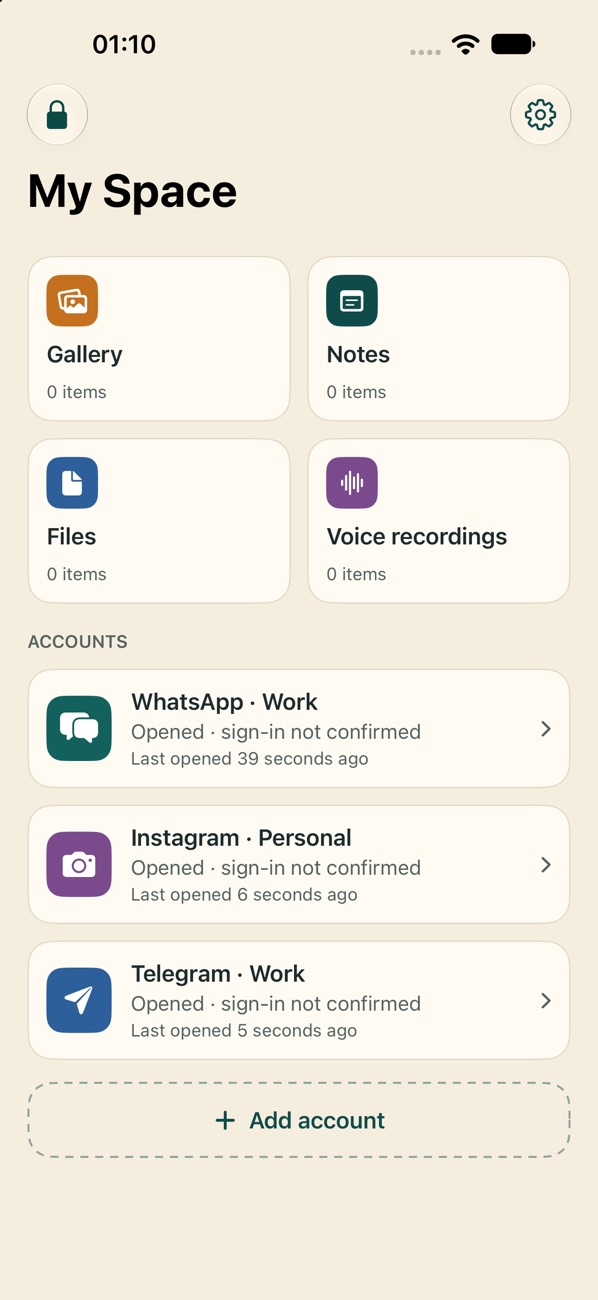
- All profiles are listed under "Accounts" in My Space; tap one to open that account.
- Each profile shows when it was last opened, and the name and colour keep accounts from getting mixed up.
- You do not log out when switching; both stay open.
Hidden gallery and hidden camera
The hidden gallery is completely separate from the iPhone's own library; photos and videos kept here do not appear in the Photos app.
- Move photos and videos into Tikmio's encrypted gallery.
- Hidden camera: photos taken with the in-app camera are saved straight to the hidden gallery without ever passing through the iPhone library.
- Photos you download from websites opened in your profiles can be saved to the gallery too.
Hidden folder, notes and voice recordings
- Files: an encrypted folder for PDFs, documents and other files, including files downloaded from websites.
- Notes: visible only while the private space is open.
- Voice recordings: recorded inside the app and kept in the private space.
- Encrypted backup: export your data to an encrypted backup you can restore on another iPhone. Make a backup before changing phones.
Security settings
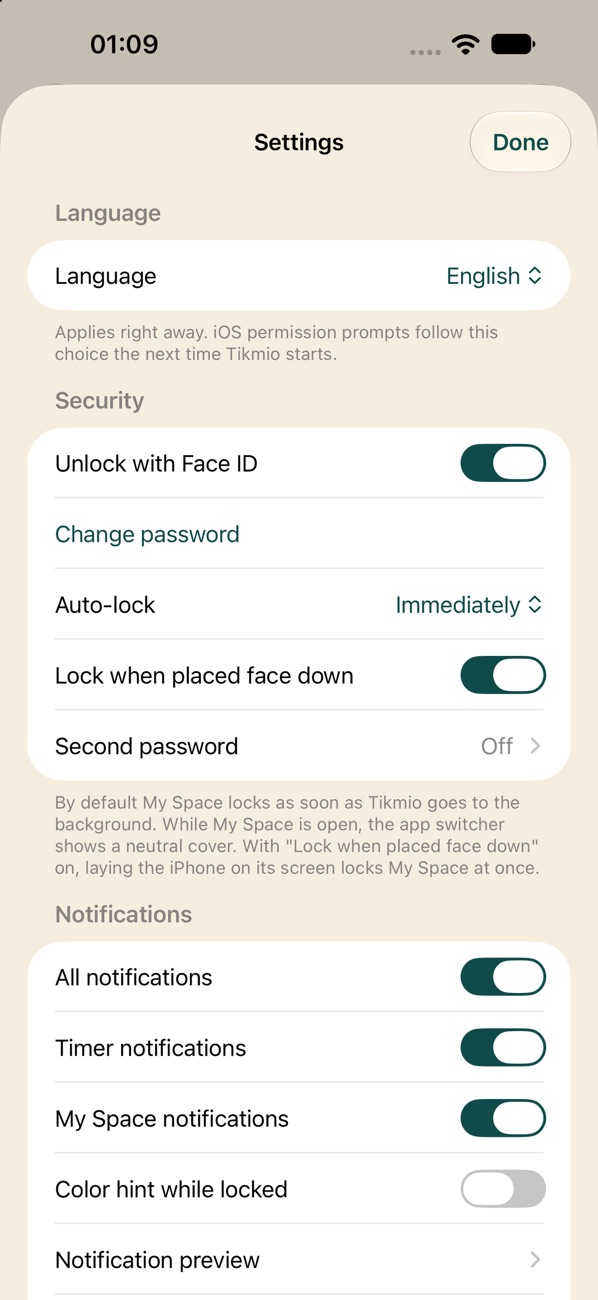
- Unlock with Face ID: open with your face instead of typing the password each time (optional).
- Auto-lock: by default My Space locks as soon as Tikmio goes to the background.
- Neutral cover: while My Space is open, the app switcher shows a neutral cover.
- Lock when placed face down: when on, laying the iPhone on its screen locks My Space at once.
- Second password: optionally set a second password that opens a separate, independent space.
- Colour hint while locked: a small, discreet colour mark for unread items while locked (optional).
- Change password: in the Security section of Settings.
Tikmio never stores your password. It unlocks a random key kept in the iOS Keychain on this iPhone only, and the account list is encrypted with that key.
Limits worth knowing
- Tikmio opens these services' websites, not their apps. Whether a feature exists on the web version depends on the service; not everything in an app is available on the web.
- Tikmio does not relay message notifications for these services. Open the profile to see new messages.
- Tikmio is not affiliated with WhatsApp, Instagram, Telegram, Facebook, X, LinkedIn, Threads, Microsoft or Meta.
- Each service's own terms of use apply; following them when using several accounts is your responsibility.
Who is it for?
- Shop and business owners running a work line and a personal line on one phone.
- Social media managers handling several brands who want client accounts kept apart from their own. If you would rather hand the work over entirely, see our services.
- Anyone who sometimes hands their phone to others and does not want private photos or documents on view.
- People running two Instagram shops or talking to customers from two numbers. Once messages grow and a team needs to reply, a CRM system is the better tool.
Frequently asked questions
Is Tikmio free?
Yes. Tikmio is free on the App Store and has no ads, sign-up or subscription.
Can I use two WhatsApp accounts on one iPhone at the same time?
Yes. You link your second number to a WhatsApp profile in Tikmio as a linked device. One account stays in the WhatsApp app, the other in the Tikmio profile. The second number's WhatsApp account must be set up on a phone.
Does Tikmio see my WhatsApp or Instagram password?
No. You sign in on the service's own official page. Tikmio never shows its own login form and never asks for those passwords.
Can someone tell there is a hidden space in the app?
The app opens as an hourglass countdown timer, and the private space is entered by touching and holding the hourglass and then entering the password. While the space is open, the app switcher shows a neutral cover.
Where is my data stored?
Only on your iPhone. Tikmio has no server; photos, files, notes and the account list are kept encrypted on the device.
Will I get notifications for new messages?
Tikmio does not relay message notifications for these services; open the profile to see new messages. You can optionally turn on a small colour hint for unread items while locked.
Which iPhones does it run on?
iPhones running iOS 17 or later. The app is available in English and Turkish.
Premium web design at competitive rates
Wind Medya is a Google Partner agency in İstanbul helping businesses worldwide launch high-converting websites, run Google Ads and rank on Google — European quality, fluent English, without European price tags.
Get a free quote WhatsApp